Employee onboarding
Turn a first-week handbook into focused onboarding

Try this
“Using @OnboardingHandbook, build a first-week path covering secure work, handoff, escalation, and completion.”

Upload procedures, work instructions, and handover checklists to generate training videos that keep the order, decision points, and responsibility path visible.
Employee onboarding
Try this
“Using @OnboardingHandbook, build a first-week path covering secure work, handoff, escalation, and completion.”
Operations training

Try this
“Using @CustomerRequestSOP, turn intake, classification, routing, evidence, handoff, and closure into one clear workflow.”
Illustrative workflow · Assembly Sequence
Try this
“Using @Northforge Packaging Line Changeover Checklist, turn the source into a clear assembly sequence explanation for manufacturing operators.”
Bring a diagram to life
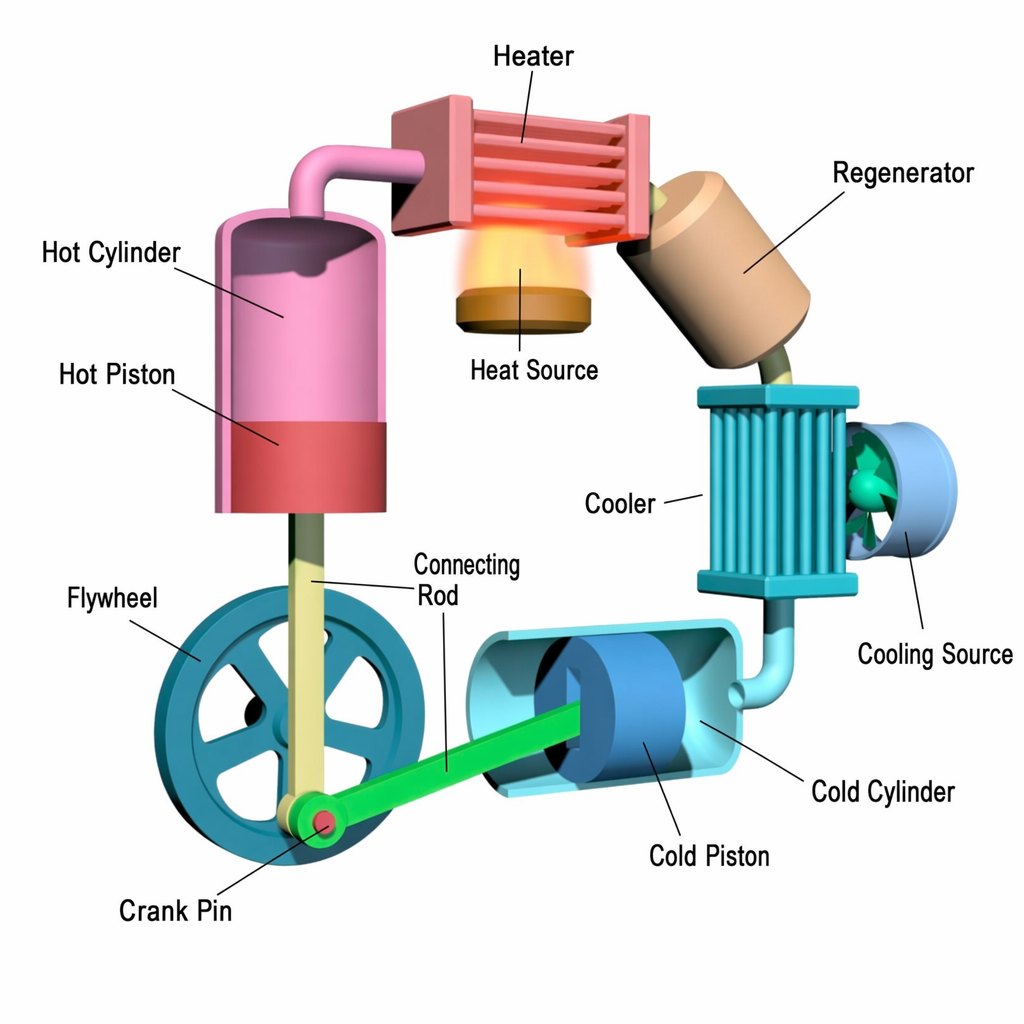
Try this
“Using @StirlingEngine, animate the component motion and energy conversion.”
You need people to understand what to do, why the check matters, and what to do when the normal path no longer fits.
You want documented practice to be easier to revisit without hiding the responsibility to verify it in context.
Prepare your documents
Turn an SOP or work instruction into a training video that explains the order, reason, and escalation point for each step.
A focused path
Name the role, the moment of work, and the step where someone needs to decide, check, or escalate.
Add the current source and name the sections, terms, figures, or steps that the explanation must preserve.
Have the accountable process owner check step order, non-negotiable wording, and escalation guidance before the video is used on the job.
Useful next step
Turn one repeatable procedure into training people can revisit at work
Use a focused SOP, checklist, or work instruction to create a training video that makes the next operational decision clear.
Use this resource Templates and checklistsA practical, copyable checklist for preparing an SOP, checklist, or work instruction for a clear training video.
Use this resource Training design templateA copyable training-video storyboard template for making a procedure, check, exception, and handoff easier to follow without replacing the source procedure.
Use this resource Source-backed caseSee how a packaging-line changeover checklist becomes an operator training video with safety checks and a readiness decision.
Read case design Source-backed caseWatch a warehouse receiving-exception handoff become a safety and quality training video with visible checks, clear ownership, and an accountable next step.
Read case designUse each format for the job it does best. The controlled SOP remains the source of truth; video makes a sequence or training moment easier to understand and revisit.
Use for exact parameters, exceptions, version history, and formal sign-off.
Keep the current document available whenever people perform or verify the procedure.
Use for a focused visual walkthrough of one repeatable procedure.
Show the normal sequence, checks, stop conditions, and handoff without trying to carry every edge case.
Use when a learner also needs role context, reasons, and decision points before doing the work.
Organize the training around one workplace moment, then link back to the current SOP for exact requirements.